Hyperglyph Tree Designer
A browser tool that designs branching, tree-like hyperglyphs and exports them as Glyph Composer templates. Nothing to install — it runs entirely in the page, with a live 3-D preview and the template JSON updating as you drag the sliders.
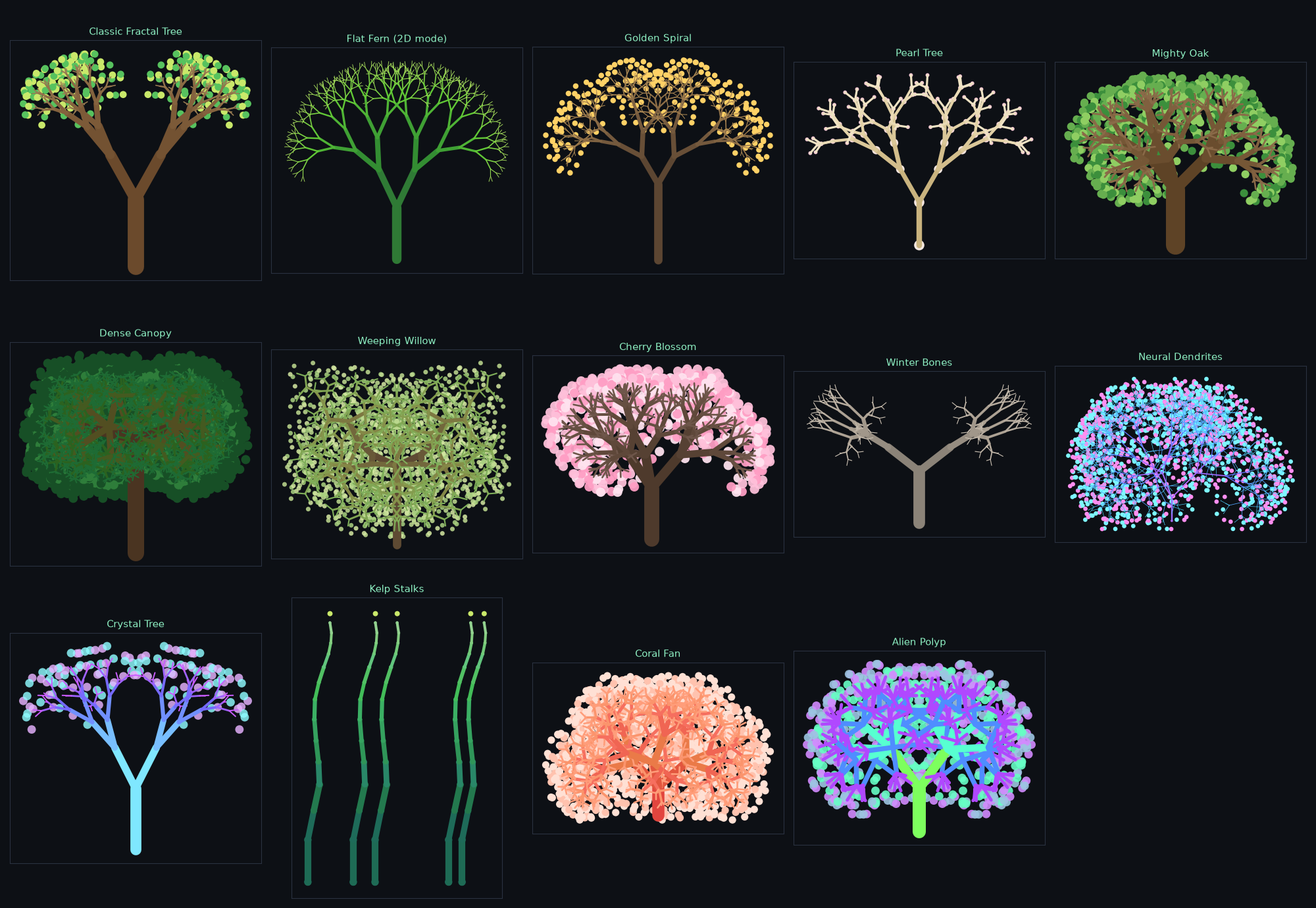
It is a 3-D port of the branching engine from the 2-D Fractal Forest drawing tool, and it keeps that tool's vocabulary — Branch angle, Angle random, Length scale, Base width, Width scale — so a tree you know how to describe in two dimensions transfers directly.
The idea
A tree here is built from two kinds of object:
- Joints — ordinary glyph nodes at every branching point.
- Limbs — Link nodes stretched between a joint and its parent. A link can be any geometry, so a limb may be a cylinder, a cone, a pin, or a cube.
That split is what makes the result read as a tree rather than as a cluster of touching shells: the joints carry the structure, and the limbs are the visible branches spanning the gaps between them.
Workflow
- Pick a preset, or start from Classic Fractal Tree.
- Shape the tree with the Branching controls (see below).
- Choose limb and joint geometries, colors, and blossoms.
- Download .json (or Copy).
- In GlyphViz: Tools → Glyph Composer → Load Template…, then Insert into Scene — or Use as Draw Brush to paint whole forests with Draw Mode.
Press 🎲 New Seed to re-roll the jitter, or ✨ Surprise Me for a random preset with mutated parameters.
Branching
These are the controls that decide the tree's shape.
| Control | What it does |
|---|---|
| Branch levels | How many times the tree forks. Node count grows fast — see the object counter. |
| Branches / fork | Children at each fork. The 2-D tool always used 2. |
| Branch angle | How far each branch turns away from the direction its parent was heading. The single most important control. |
| Angle random | Per-level variation in that angle. A little makes a tree look grown rather than printed. |
| Fork twist | Rotates each fork's plane around the parent branch. 0 gives a flat, 2-D-style tree; 90 gives alternating perpendicular forks; 137.5 approximates the golden angle. |
| Twist random | Per-level variation in the twist. |
| Length scale | How much shorter each generation is than its parent. |
| Length random | Per-level variation in that ratio. |
| Lean random | A small extra tilt per level, breaking up perfect symmetry. |
| Base / Branch length | Trunk length and branch length. |
| Tree size | Scales the whole tree in world units. |
Branching is direction-relative: every branch continues its parent's heading, deviated by the branch angle, recursively. That is the mechanism the 2-D tool uses, and it is why the output reads as a tree.
Jitter is per level, not per branch
A Glyph Composer template stores one specification per level, applied to every branch at that depth, so random variation is baked in level by level (the 2-D tool's "unify per level" mode) rather than branch by branch. Deeper trees therefore show more variety.
Limbs
Limb geometry picks the shape stretched between each pair of joints, and Base width / Width scale taper the limbs the way Length scale tapers the branches. Limb color can either follow the joints or use its own two-color bark ramp.
Limb thickness is expressed in world units, so it does not shrink with the branch frame — that is what lets thickness taper on its own schedule.
Joints
Joint geometry can be any glyph — sphere, cube, octahedron, torus, and so on.
Joint size has two modes:
- Match limb thickness (default) — each joint is exactly as thick as the limb arriving at it, so joints sit flush and the branches read as smooth tapered wood.
- Follow branch taper — joints take their size from the branch frame instead, growing large relative to thin limbs.
Joint scale multiplies whichever mode is active. At 1 the joints are flush; at 3–5 they swell into pearls threaded on a stem.
Resizing joints does not reshape the tree
In GlyphViz a node's rendered size and the coordinate frame its children are placed in are the same quantity, so naively resizing a joint would rescale everything below it. The Designer compensates: each level is written as a ratio that telescopes to the joint size you asked for, and each child's reach is divided back out. Branch lengths stay put no matter what Joint scale does.
Limb origin chooses whether limbs leave a joint's center (Point) or its surface (Sphere).
Blossoms
An optional final level of small glyphs at the branch tips — the 2-D tool's blossoms. Size is in world units and stays constant however deep the tree, so blossoms remain visible on a nine-level fern. Stems gives each blossom its own little link.
Grove
Repeats the whole tree in a ring, row, grid, or random scatter, in one template.
Known limitation
A template level applies one branch angle to all of its children, so there is no leader branch — one child continuing straight up while its siblings splay out. Conical, spire-shaped conifers are therefore not expressible today; the broad, rounded forms are.
Next step
Return to the Reference overview, or see the Glyph Composer page for what happens to a template once it is loaded.