Bird Song Spectrogram Surface
A real field recording's spectrogram rendered and animated as a deformable Surface-topology grid — a showcase of what TOPO_SURFACE alone can do with real audio data.
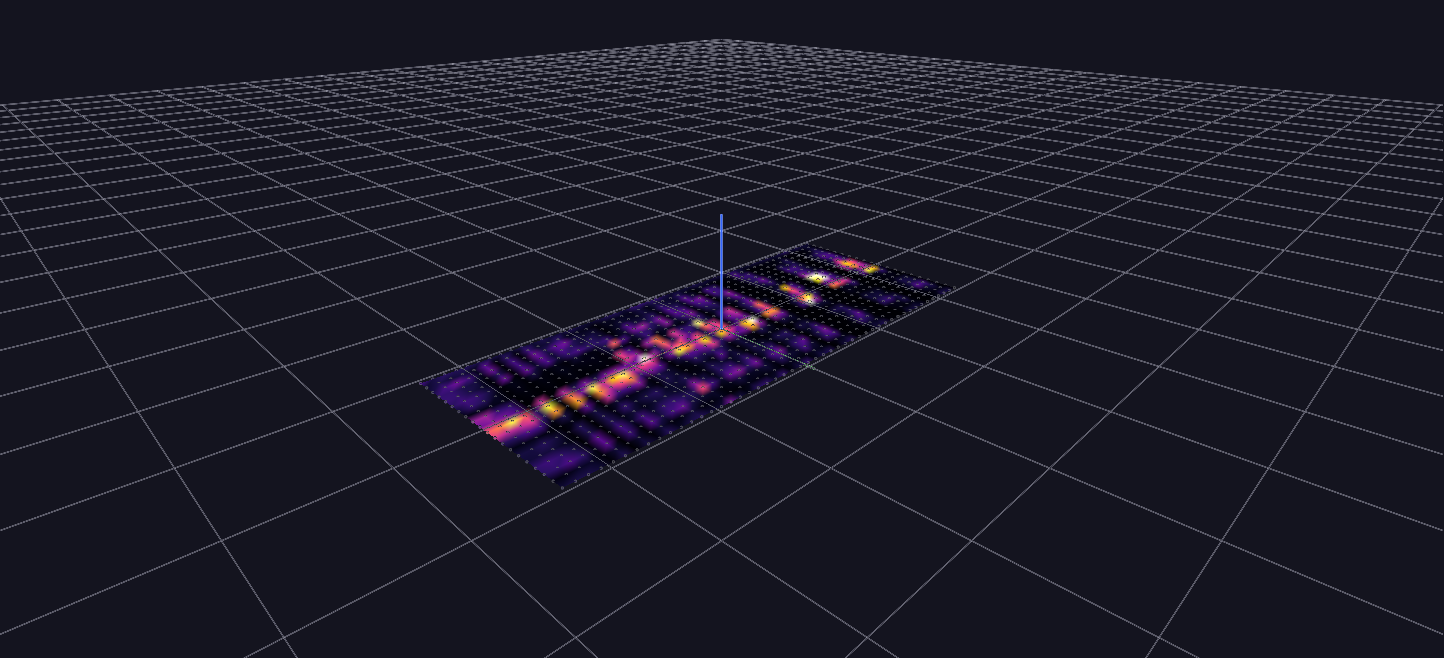
Try it: download this example below (or the full examples set), then open Bird_Song_Surface_Topology_Example/Bird_Song_Surface_Topology_Example_gv_node.csv — or just drag its folder onto the GlyphViz window. Press Space to start the animation.
What it is
A northern mockingbird sings for ten seconds, and the scene draws what that sounds like as a landscape. Time runs along one axis of a grid and pitch along the other, and the height of the ground at each point is how much sound there is at that moment and that pitch. A spectrogram is normally flat, with brightness standing in for loudness. Here it stands up.
It is the audio scene to open if you want to see what the Surface topology can do on its own. There are no glyph swarms in it. One grid of points is moved up and down, and that is all.
How to read it
- Left to right is time, ten seconds across 48 columns.
- The other axis is pitch, from about 700 Hz at one edge to 10 kHz at the other, over 20 rows. That is the range where a mockingbird's calls actually have content; a generic 20 Hz music floor would have left most of the grid empty.
- Height and colour both say how loud. Each point is coloured on the inferno scale, black for silence through purple and orange to pale yellow for the loudest sound, and the colour is fixed. Look at the grid before you press play and you can already read the whole song as a heat map.
Press Space. The recording plays, and a wavefront sweeps across the grid in step with it. A column of the song is flat until the wave reaches it, snaps up to its full height as the wave arrives, and then relaxes back to flat over the next five columns. Only a narrow band around the wavefront is ever in motion, so the picture reads as a ridge travelling along the song while the part already played falls away behind it.
Pitch and time read independently, so a sound that holds one pitch shows as a ridge running along the time axis, and a sound that sweeps through pitches shows as a ridge that climbs or falls across the rows.
What to try
- Orbit while it plays. Seen from the side, the wave is a profile of the spectrum; seen from above it is the flat spectrogram you would find in a textbook.
- Scrub. Stop the playback and drag the Channels slider, which moves the wavefront to any point in the call.
- Compare it with the terrain example. Cowles Mountain Terrain uses exactly the same topology on a static elevation model. This scene is the same mechanism with the heights animated by Channels.
How it is built
The scene is 961 nodes: one Surface-topology root and 960 children, one for each point of the 48 × 20 grid. Under a Surface parent a child's translate_z is simply its height, so the entire animation is one Channels mapping per point, 960 mappings all bound to translate_z, over 300 frames at 30 frames per second.
The generator, generate_bird_song_surface_topology.py, makes the spectrogram with the same band analysis as the other audio scenes, but set up differently: here the analysis frame rate is chosen so that it returns about as many frames as the grid has columns, so the spectrogram's time resolution is the grid's. The animation's 30 frames per second is a separate clock that only sets how smoothly the wave sweeps across those columns.
The sweep follows a simple rule. A column's multiplier is zero until the wavefront arrives, then falls from one to zero along half a cosine over the five-column tail, and the point's height is the spectrogram value times that multiplier times a peak height of six units. The wave starts at the first column on the first frame and finishes decaying the last column on the final frame, so there is no abrupt cut at either end.
An earlier version of this example paired the surface with a video-textured screen and an FFT glyph bloom. It was dropped: a video texture keeps its own playback clock, which cannot be locked to anything else in the scene. The WAV played through the Channels audio sync has no such drift, because it is the clock.